




Editing Style Guide
Overview
This article covers the styles and conventions of making edits and complements the article on the mechanics of editing. Fully utilizing these styles and conventions will expedite review and approval of any factoid history data submissions.
NOTE Use the best and most current research for your factoids, but it is understood that even the best research has uncertainty. It is assumed that there will be better data available next year, and the year after. We are trying to load the world history model with the best data of today, while research is always working to make better data available tomorrow. If the best source says the city's population was 30,000 people in 1100, then enter that data factoid and provide a citation. When new research comes to light, then that 30,000 value can be reassessed and the two citations compared for which has the better methodology.
Borders
High resolution border details are often known in the early-modern era for regions such as Germany and the Low Countries. Detailing of such information is highly encouraged.
Low resolution border details are often all that is known in pre-history. Sometimes no formal border existed -- only degrees of claim over a city or territory. Running Reality cautiously uses what we call a post-Westphalian border approach, though with a clear understanding of the limitations and trade-offs of doing so.
Uncertainty in border edges should be represented by a smoothing of the edges. The degree of rounding may be made proportional to the uncertainty. For example, ancient cultures are often represented by nearly-round ovals across a general region.
When a river, stream, or bay is a likely edge to a border, trimming to that river/stream/bay is preferred. Same for mountain ridges with few passes. This approach is approximate, but adheres to the idea that a discrete border line is visualizing areas of control. A great many modern maps of historical borders use this same approach, often without it being obvious or explicit because they don't show the terrain.
Adjacent borders subject to uncertainty should be represented by a smooth gap between the borders, unless one border was known to be actively encroaching upon the other, such as during an invasion.
Overlapping borders should generally be reserved for times when physical overlapping of peoples was expected to be occurring, or when referenced maps show such overlaps themselves. In other circumstances, borders of two objects are derived from separate sources (and likely recorded on different dates), but lead to overlap at some other date within the timeline of both objects. This is expected and acceptable, however if one nation or cultural group can be determined with a small amount of extra research to be dominant to resolve the overlap, adding a new territory factoid to render this is preferred.
The division between when to use the Nation and CulturalGroup object types is ambiguous.
Nation may be used for a wide variety of entities believed to have a coherent state-like
level of organization, even if not a nation-state in the modern sense. If there is no formal
central government, use a CulturalGroup
CulturalGroup object types may be used in a similarly flexible manner, representing both
named groups of indigenous peoples, as well as stages of archeological periodization. This generic high-level
type can be subtyped (i.e. Tribe) for more specific local terms or additional semantic nuance. Use
overlapping CulturalGroup objects to show both a wider, broader culture and the specific groups
within that same culture, but use a specific subtype for the specific groups.
Nation borders are not intended to change during modern era conflicts with each step of
each army, such as the Napoleonic Wars, WWI and WWII. Running Reality uses de facto borders for history
up through early-modern times, and definitely until at least the Peace of Westphalia.
It uses de jure borders in modern times, and a blend of de facto and de jure in early modern
times. Contested territories are most readily shown by showing the motions of the invading or occupying forces.
This provides significant context for the viewer to understand the situation.
Running Reality is studying ways to show contested territories and territorial claims in a way that can fully
represent the history and its nuance. This is a challenge because of complex and sensitive modern disputes. It is
also a challenge because some historical claims were quite vast,
over areas not understood by the claimant, and/or in a charter recognized by only the charter's few signatories.
Nation and CulturalGroup borders should, when possible, not try to include every coastal
detail and estuary on their edges, but instead should be drawn to "near" the coast they
controlled. The concept of territorial waters is a relatively recent one in human history, originating
with the idea of "those waters that can be defended from the shoreline" and roughly corresponding to
the distance a cannon ball could be fired. Therefore, most pre-modern borders should not be drawn
with the 12 nautical mile limit of modern international law and treaties. One technical consideration
is that the linkage of nations to cities is done algorithmically, so a nation's borders should extend
just far enough into the water to ensure that coastal cities are properly marked as being within that
nation in those years.
After creating a new object, it is recommended to check into the past and future for the lifecycle of the new object, to see if border matching in time is needed. The citation type ‘Match to Adjacent Object’ may be used to indicate when a new object was fit to preexisting objects, absent other temporal information.
Nature Objects
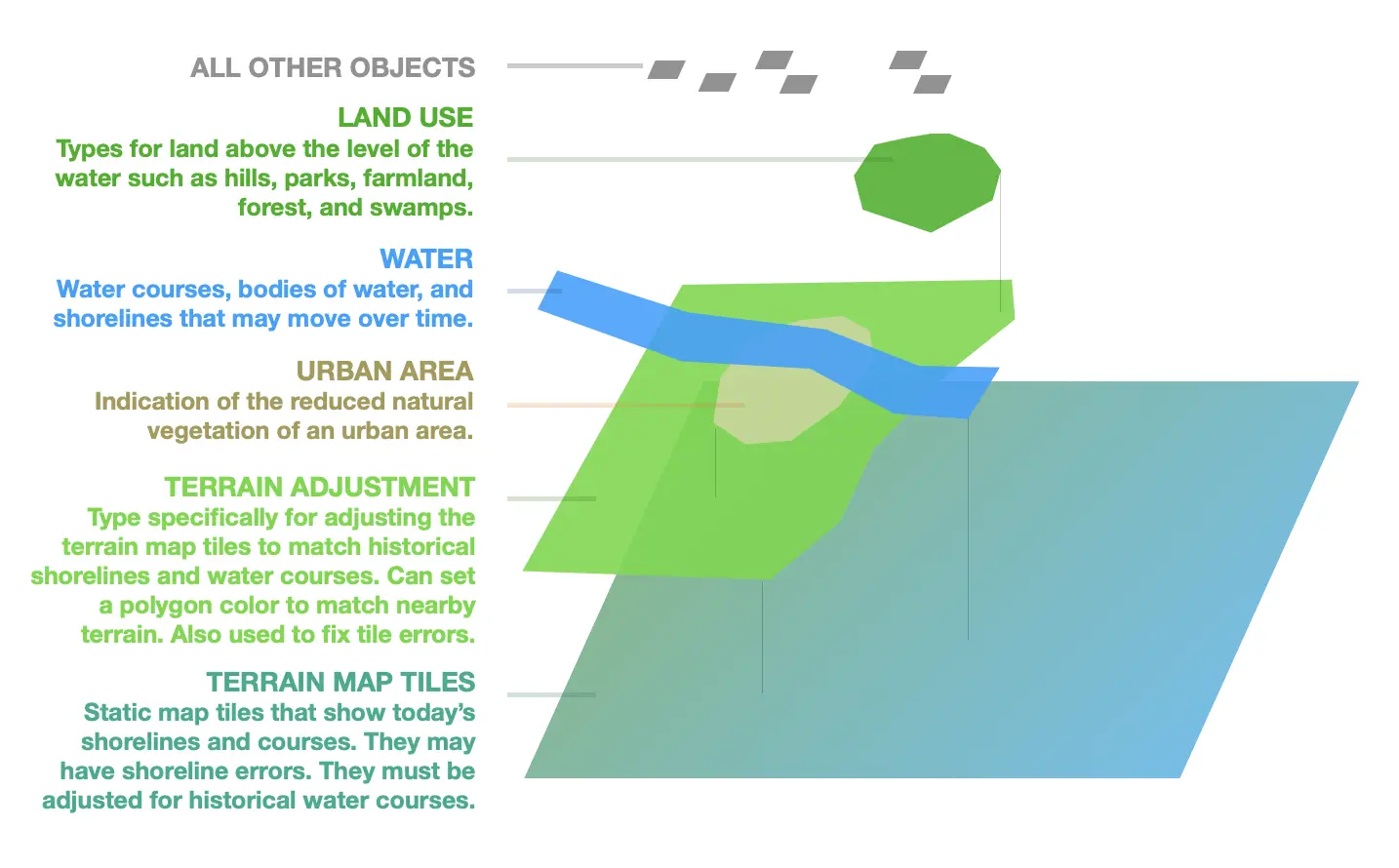
Nature and geographical objects are generally rendered below other objects and are temporal to allow them to adjust to changing conditions over time. This diagram gives the rendering order of the different types:
Bay objects are useful for defining coastlines with more meter-level fidelity than
what is provided by the static background map.
Defining coasts using Bay objects works best when multiple levels of bays are used.
For example ‘Baltimore Inner Harbor’, ‘Baltimore Outer Harbor’ and ‘Chesapeake Bay’
would all be separate entities. The reason for this is so that the entire largest
object does not need to be updated across all time steps for every fine-scale change such as near
a city center. Use one large Bay for areas away from an urban shoreline, then a second Bay for the
close-in adjustments of the city's harbor or land reclamation. This technique is used when there was
more water in the past than in the present day.
It is recommended to extend Bay objects used for such purposes some distance out
into the surrounding outer water body, so that colors match in the final map. Look
at the background map tiles/pixels to get a sense how far out is appropriate. Take
care to smooth corners and match coastlines near edges.
Polygon objects are currently limited to not contain holes. This makes definition of
islands within bays difficult. Multiple surrounding bay objects may be used for this purpose. Hill
objects may also be used for small islands, though the name Hill is a bit of a misnomer.
Polygon objects of different types should not self-overlap. Objects of the same type (such as an inner harbor and outer harbor) may overlap by just a few tens of meters to prevent gapping.
TerrainAdjustment objects may be used as the opposite of Bay objects, to create sharp land-side
edges. These are intended as direct adjustments to the underlying static raster map tiles. You can set
a custom color on a TerrainAdjustment to make it more precisely match the local background tile color. There are
two primary uses: First, they can help show shoreline changes over time where the static map tile only shows
the present day land and water. Usually you would use them in conjunction with Bay objects for this.
This technique is used when there was more land in the past than in the present day.
Second, they correct circumstances where the background map does not sufficiently
make a region appear as solid ground, such as near river deltas and wetlands.
Like all Running Reality objects, Bay and TerrainAdjustment objects can and are encouraged to
change in time whenever appropriate.
Forests and Lakes containing many isolated sub-regions may be defined equally well
either as one object with ‘regions’ or as multiple objects.
Stream and River objects may have their width defined, however this width applies
for the full length of the object. If significant width change occurs and is relevant,
multiple smaller objects may be used. Alternatively a Lake or Bay object may be used to
define the tapering.
Bay or Lake objects are encouraged to be used to define complex river edges of historical
importance that are poorly represented by a fixed-width meandering line.
If needed, one river may be represented by a combination of Bay/Lake, River, and Stream
objects to create the best visual final result.
Users are encouraged to draw background objects such as parks or forests first, and route objects like streams and roads second.
Factoids defining the creation or removal of nature object types such as Forests and Lakes are optional, and should only be added if a clear change is known. Nature object types with no creation event factoid default to rendering indefinitely back in time.
Movements of Ships, Armies, People, and Things
Movements are a complex feature that brings life to the Running Reality map. The philosophy is "history playing out on a map" and not "a history map." The difference between these is that a dynamic world "model" shows movement whereas a map is static. However, representing movement is complex, especially when trying to properly represent that much historical movement information is inherently uncertain.
There are four types of movements that Running Reality understands, some of which are highly developed and some of which are still in development:
- Multi-day Movements This movement is a sequence of coordinates and dates. A line is drawn on the map, with an arrow. The object is drawn at the location along the movement for that particular date, which may be a linearly interpolated location.
- Single-day Movements These movements allow hourly detail for movements on a specific single day, such as the motion of a cavalry unit during a battle. See suggestions below in the battles section for representing battlefield movements. These display on the map with a line and arrow and the object icon at the start of the movement.
- Named Location Movements This category covers cases where the historical record contains a journey's origin and destination, but not the details of the route taken. For instance: a ship departing London and arriving in New York City. For longer such movements, Running Reality can not just interpolate a straight line motion and instead relies on routes. For a ship transiting the Atlantic Ocean, it would follow along a network of SeaRoute objects so the ship doesn't just pass across the land due west of London right across Wales.
- Co-located Movements IN WORK This category covers cases where the object's motion is actually determined by the motion of another object. This can be riding a train, a ship's captain sailing on a ship, an army commander marching with the army, or an infantry unit marching with the larger army.
An alternative to an explicit movement is a series of single-point locations. Running Reality linearly interpolates the location of movable objects between known factoids. Use a series of single point locations if the historical record only documents when someone or something was in particular places. An example is a sculpture that is known to have been in multiple buildings and plazas, but the transit between them is unknown. In this way the factoids represent only what is explicitly known, the engine can interpolate the movement, and room is left for new knowledge to be added in between known points. Routes with waypoints should be used if it is wished to have a colored arrow render on-screen for the entire swath of motion, such as the full path of the advance or retreat of an army, or the full path of a ship's expedition.
If adding a new movable object, at a minimum, try to provide information on the location at beginning and end of lifecycle. A small number of waypoints may be used to represent motion.
If the time of transit between ports/locations not known, just place single-point location factoids, in order to allow the Running Reality interpolator engine to render a guess at the transit. Exception: if a large landmass exists between the known locations, it is desirable not to have the interpolator show the ship moving overland. Example: For a ship traveling from New York to San Francisco, when it’s known the ship probably would have gone through the Panama Canal. In this case it is acceptable to render a seabound path with a citation note that the start/end dates are a best guess.
Battles
A battle is an explicit object that can be added to the map and have its duration set. The duration will default to a single day. The location should be placed near the center of fighting and if it is a multi-day battle the location should be set near the center of fighting on the first day. The map of a battle can be enhanced if more detail about the armies, their units, and their maneuvers are known. Adding individual units with movement arrows along with field fortifications and landscape features can show a battle as richly as any historic battle map can.
IMPORTANT It is important to take the extra steps to link objects to one another. This does not affect the look of the map, but it is important to the underlying model of what happened. If two armies battled one another, explicitly linking them to the battle object as combatants makes it easier for users to know who the combatants were by looking in the sidebar of the battle or each army. Physical proximity to the battlefield does not automatically link combatants. Similarly, linking army units to the army makes their allegiance on the battlefield clear in the sidebar. It also associates the color and can move the unit with the army after the battle. The main army can also be linked to the nation and to commander(s) so links appear in the sidebar.
Colors should be set on the main army object. Main army colors should be set similar to the nation color, uniform color, or another neutral color. Units in the army that appear on the map only during a battle deployment should be linked to the main army. When linked, they automatically pick up the color and flag of the main unit -- and change color if the main unit's color is later updated. Alternatively, main units may be linked to their subunits to similar effect. Running Reality does not use NATO APP-6 color designations that indicate "friendly" versus "enemy" armies because it is a global, neutral map.
On the battlefield, use single-day movements and consider using the following standard patterns for consistency:
- J shape: Use to indicate reversals in stance, such as an army that first retreats, but then retrenches to stand its ground (even if such retrenchment is transient). Multiple assaults or retreats within one day may be visualized by long ‘S’ or ‘W’ zigzag shapes.
- S Shape: Use to indicate a temporary pause in movement, such as a fleet that arrives offshore and pauses before re-embarking a few days later.
- V and U shapes: The sharpness of movement arrow corners may be used to represent abruptness. U shapes are preferred in general circumstances. V shapes should be reserved for when a reversal in motion was distinctly rapid.
Armies and movable units following rivers or roads may be drawn to follow near but not on the road/river, such that both the movement arrow and underlying reason for that course are simultaneously visible.
Armies should be located partly behind front lines when known battles are about to occur, to leave visual room for future detailing of the positions of specific front line subunits.
Small forward motions may be used to indicate stance, even for cases where a unit did not significantly change position. For example, in an active battle, a back-row unit may be given a small forward arrow to indicate the direction in which they were firing/defending. This helps to indicate active participation in an action, versus units that are truly far behind the lines that were both motionless and inactive (or omnidirectional) in stance.
For visual clarity, try not to create too many overlaps of arrows, unless necessary.
Longer movement arrows covering lengthy time periods are useful for discoverability and for users learning the broad scope of what a unit was doing over time. Carefully consider if a long duration arrow is appropriate. For example: use if an army merely paused in multiple towns as it traveled across a countryside, but generally kept active and moving as part of a long campaign.
If historically appropriate, try to match the duration of movement arrows of opposing units, such that maps break down in time into sequential coherent and easier to understand campaigns of action.
The exact start/end location/time of an army before/after a historical battle is often difficult information to obtain. After entering known information, check if the years/months ahead and behind the events just modeled, are at least reasonable given such uncertainty. Additional guesses for locations as well as start/end factoids may then be used to prevent obvious inconsistencies, such as a unit persisting behind enemy lines.
NOTE There is an older style of battles that you will see across the map. This older style had the battle as an event associated with one of the combatants and then had the other combatant(s) linked to the first combatant. This approach had many weaknesses, especially when the army names or exact positions were unknown or when the battle extended over multiple days. New battles should not use the old system and battles represented by the old system are being slowly replaced with the new style approach to the data.
Start and End Dates
IMPORTANT Only enter start and end dates for objects if the dates are actually known. Running Reality prefers to use the "exists" data factoid in place of start and end event factoids if the dates are not known. This better represents the temporal uncertainty inherent in the data, provides a clearer and more verifiable citation, and still allows an event factoid later if more research identifies a start or end date.
Towns should be founded on the first day they physically exist, not on the later date of formal incorporation. Incorporation may be listed as an event afterwards to make this distinction.
Building objects should start at the moment of first physical existence of any part of the structure, i.e., at groundbreaking. Completion/opening dates are appropriate if they are the only dates known.
Towns and buildings typically continue to physically exist even as ruins. Therefore it is preferred to mark them with appropriate event or data factoids that change their condition, not erase them from the map. In rare cases complete removal is appropriate.
Similarly, for ships, railroads, roads, etc., mark the first/last dates of physical existence.
The date on which ancient cities gradually convert from occupied to abandoned is often not known. However, eventually it often becomes appropriate for a city to be rendered instead as a ‘ruins’ icon. In this circumstance it is acceptable to place an ‘abandoned’ event for that city using the ‘Educated Guess’ citation type.
The start dates of most indigenous peoples is generally very uncertain. Many of the earliest groups mapped could reasonably be claimed to date back to 100,000 years ago, or even one million years ago. Some criteria for when to chose to begin rendering the object on the map can include:
- A known migration time.
- A known naming convention horizon.
- An educated guess as to when the naming convention perhaps should no further be extended.
- The rendering time horizon of similar objects already mapped.
Dates prior to 3000BC are acceptable and encouraged. Dates earlier than approximately 20,000 BC however should generally not be used.
Mapped indigenous groups tend to end in two ways: they are divided up into a larger number of smaller named groups, reflective of more information existing on a more recent time. Or else, they are overprinted by a nation-state. Typically the indigenous people continue within the nation-state for a long time after, often to present day, but only in a few cases in Running Reality is this later history rendered geographically. The following are useful conventions for how to mark start/end events for such groups:
- Use the event types ‘preceded’ and ‘succeeded’ as defaults, with neutral meaning,
- Use event types such as ‘annexed’, ‘conquered’, etc., only when the explicit circumstances of map change are known.
Running Reality uses the following default conventions in its rendering engine for when start/end event information is not provided:
- Nations: Render +/100 yrs from the last/earliest explicit factoid.
- Roads: +/100 yrs.
- Cities: +/100 yrs.
- Buildings: +/-50 yrs.
- Ships: +/1 yr.
- Armies: +/1 yr.
Cities
All human settlements are regarded as ‘City’ object types in Running Reality regardless of population.
To visually distinguish between large and small settlements, Running Reality uses population factoids to render the diameter of an on-screen oval. Therefore, especially in the ancient era, to mark a settlement as small, a population factoid, even if an educated guess, may be useful.
The number of small modern towns shown in Running Reality is limited, but literally all named towns, large and small, are highly encouraged to be added and perhaps even given detailing by users.
There are three basic approaches to detail a city/town:
- Method 1: Begin from the earliest roads/walls, and grow forward in time. This method is very hands-on, and leads to generally high accuracy in the past, but leaves the modern-era map incomplete. This can often be appropriate for works-in-progress, since Running Reality is more about history, and certainly not intended as a replacement for modern-era online roadmaps.
- Method 2: Add the modern road map first, but leave the ‘built’ factoids for all roads unspecified at first. Then, gradually create earlier historical map stages by using already-imported modern roads, and assigning them ‘built’ dates. Significant changes in routes may be required for this method. This method can take strong advantage of many automatic object importation tools available in Running Reality.
- Method 3: A city/town may also simply be drawn as it exists on any date in the middle of its history, following any historical map that a user has as a citation. Later work may readily incrementally work forward and backward in time from this map. This method is highly convenient when a single map is available. The drawback to this method is it subsequently relies heavily on Running Reality’s own interpolator rules for rendering roads before and after a single location factoid.
To begin detailing a city, it is often helpful to first look up the oldest known structures in that city, such as ancient temples. Adding early buildings first will help to frame which areas of a city were constructed at what times.
When a building appears, it is plausible that the earliest roads to that location may have also appeared. If better information is not available, the factoid citation type “Match to Adjacent Object in Time”, may be used to indicate the plausible appearance of roads because of the appearance of buildings nearby. All such citations assume they may eventually be corrected by better maps.
‘Road’ objects are used to represent all similar human pathways, from dirt tracks on up to superhighways. ‘Width factoids’ may be specified, to visually differentiate narrow medieval alleyways, dirt roads, large avenues, and broad highways. Airport runways may also be specified in this manner.
City walls, when appropriate, are highly effective in visually representing the populated extent of cities in the ancient era, even when detailed road locations are not known. Therefore, adding city walls first, can be valuable.
City walls often exist to the present day, even as ruins, and even if only in small remnant segments. Therefore, most city walls are created with the assumption they ‘exist up to the present day’, and changes in the route factoid are often best for when major sections are torn down.
Canal, Lake, or Bay objects, may all be used as appropriate, to delineate moats and waterways between early-modern fortifications and city wall bastions.
Citations
Check the current reference list to see if the source you are using is already entered.
For journal articles, the first word in the name should typically be the surname of the first author.
Use ‘et al.’ for more than three authors.
For maps, the first word of the citation name field is encouraged to be the year of the map, so that maps can easily be perused in the reference list by date.
Wikipedia (and similar sites) can be useful as a reference without further detailed attribution for the following:
- Founding dates for cities.
- Construction/event dates for buildings.
- Lifetime event dates for historical people.
- Dates of battles.
Wikipedia is less preferred for geospatial information, in which case specific named maps are strongly preferred if known.
Often multiple citations are involved in one factoid, as factoids include both temporal and spatial information. If one citation is more unique, or more dominant, it should be the item entered. For example, if a specific named historical city map is being used for reference, but an educated guess is also used to build a road from that map at an earlier date than the map itself, use the citation for the map, not the ‘Educated Guess’ citation type.
If a single citation is truly insufficient, use the ‘Note’ tab to attach a note to a new factoid. Notes should be reasonably brief, as they must be downloaded along with all factoid datasets.
Names
Running Reality prefers natural, human-readable names wherever possible rather than code numbers or database IDs. This keeps raw factoid data understandable to contributors and reviewers, instead of requiring every object to be identified by a machine-oriented code. Anonymous objects are possible, and those will be assigned a code as a name.
Create a name factoid from the "ADD OTHER" button to open the metadata factoid editor.
- A
referencenameis the unique name used internally to the app to uniquely designate this object. All factoids for this object must use this name. An anonymous object will be a assigned a unique code as its reference name at the time it is created, usually with the patten[type][id]. - A
displaynameis the name shown to the user and it can change over time. For example: Byzantium to Constantinople to Istanbul. You can add adisplaynameand give it a date from which it is used as the primary name. These can also be used to give a name to an object created as an anonymous object. - An
altnameis a name not to be used for display but to be used for search. If there are multiple spellings or nicknames for an object, add the other names so that people can find it via a search on that alternate name. For example: New York City or NYC. Likewise: Julius Caesar or Gaius Julius Caesar. - A
catalognameis a special spelling or code for a catalog entry. For example: the Wikipedia page might have underscore characters or have a suffix for disambiguation, or a catalog ID number such as Pleiades. Use as the citation, the citation of a catalog. If a citation is marked as a catalog, then it will use the catalogname as a suffix. For example: you do not have to do special work or create a dedicated citation to have an object link to its Pleiades database record; just add a catalogname with that ID and a citation of Pleiades and Running Reality will wire those together. The same applies with Wikipedia: do not cite the object’s own Wikipedia page because any factoid that cites Wikipedia will cause Running Reality to send visitors to the object’s Wikipedia page, and if that page has a slightly different name than the Running Reality object name then add a catalogname factoid to clarify it. - A
languagenameis the same name as the object but in a different language or alphabet. You can add multiple languages. Ideally, we would have lots of these entries but in practice 99% of objects only have an English name. More languagename factoids would be good, though this is also maybe a better task for a future AI assistant to do.
Objects can be anonymous. They will have a name that is a code and display as
Anonymous [type name]. An object is automatically made ‘anonymous’ simply by creating
a new object with an empty name field. The name can be refined by later factoids in several different ways.
When possible, prefer the use of named objects over unnamed anonymous objects. Some
exceptions to this guidance include: nature objects such as forests or pre-modern city roads.
For buildings imported from OpenStreetMap, sometimes only a code number is available. For buildings or streets traced from a historical map no name
might be available. If a name is identified later through additional research, long after the object has been
created, a displayname can assign a name.
Modern names are preferred as object names. Historical names are best set as altname,
as well as displayname that vary the object label in time.
Matching to names used in Wikipedia articles helps allow automatic linking of Wikipedia
entries to objects in maps. Alternatively, such linking may be achieved by use of the
catalogname special factoid type.
Commas have a unique purpose to assist with deconflicting similar names. Name text after commas is not rendered
within on-map labels, which allows a name to remain visually simple while still being
unique within the system. This is useful for distinguishing objects that share the same
visible name, such as town names that repeat across several U.S. States, or multiple
buildings or streets with the same name in different cities. For example,
1st Street, City1 and 1st Street, City2 will both display on the map
simply as 1st Street.
The technical considerations for valid names are:
- Capitalization of all primary words within proper names is the standard for Running Reality objects.
- International characters and dashes are acceptable.
- Parentheses ( ) and square brackets [ ] are not allowed.
- Leading and trailing spaces are not allowed.
Naming conventions for military objects are complex. The following conventions are useful:
- Late Modern: ‘Numbered Corps/Division/Battalion - Nationality’
- Early Modern (If commander is known and constant): ‘Nation - Commander surname’
- Ancient (If no other military units of same Nation/group exist): ‘Army of Nation/Group’
Colors
Some objects respond to the color factoid, such as nations, provinces, cultural groups,
sites, and military units. This is more of a “flag color” or “uniform color” than the
physical color of an object. Physical appearance is handled through temporal data types such
as Structure or Physique data factoids.
Nations, Cultural Groups, Provinces, and Armies, are assigned colors randomly but
may be overridden with explicit colors via a color metadata factoid. The Running Reality team is ultimately
responsible for map coloration choices but welcomes color suggestions for new objects
being submitted.
Create a color factoid from the "ADD OTHER" button to open the metadata factoid editor.
For Nation and Province colors:
- Scan all past/future adjacent boundaries for color conflicts.
- Provinces of a Nation should use subtle shade variations of the host nation color.
- Distant overseas colonies of a Nation are preferred to be recorded as separate objects, but should use a color similar to the host country if possible.
For Army unit colors, maintain consistency with other army units of the same nation.
- Running Reality does not use NATO APP-6 color designations that indicate "friendly" versus "enemy" armies. Running Reality documents the historical facts of a battle but does not take a position on the combatants.
- Choose either the exact same color as the Nation or a slightly darker color for more visual contrast on screen.
- Use subtle shade variations for units of the same nation acting near one another.
- If there is no appropriate nation with a nation color, consider red/blue pairing for ancient battles.
NOTE There are inference rules for unit colors, if a unit color is not explicitly specified.
Linked unit objects automatically inherit color from their linked parent Army
object, so setting the army color will set the color of associated infantry and
related units as well. This automatic inheritance currently applies from Army objects to linked units,
but not from Nation objects to armies. Further, uniform colors for 3D models of
infantry units may be inferred from the unit's color. A 3D model of an infantry unit might be tagged
as having a blue uniform, so that 3D model will score as a better match when inferring a model.
Feedback
If you can not find an answer here, please feel free to ask us for help. Send us an email if you would like us to get back to you with a response:
Send the Running Reality team an email: